Make a Payment
Pay your bill anytime, anywhere.
Use your debit card or bank account to pay your bill through the method most convenient for you!
- Manage your account and make payments 24/7/365
- Make one-time payments or set up recurring payments
- Check your loan balance and view payment history
Making payments has never been easier! Access the Online Payment Portal to make payments from wherever you are in just a few simple steps. Whether you want to create an account for faster future payments, or need to make a one-time guest payment, getting started is simple.
Create and account for reoccuring payments:
- Step 1: From the Online Payment Portal page, click Create Login.
- Step 2: Complete the required fields and click Save. This generates a welcome email to you.
- Step 3: From the welcome email, click Set Password.
- Step 4: Create your account password and click Save Password.
- Step 5: You are directed back to the Online Payment Portal page. Click Customer Login to access your account and make payments.
One-time guest payment:
- Step 1: From the Online Payment Portal page, click Guest Account Lookup.
- Step 2: Complete the required fields and click Lookup.
- Step 3: From the Accounts page, click Pay to make a payment.
Text Pay
Make payments and chat directly with support representatives via Text Pay (SMS).
- Pay immediately from anywhere, 24/7/365
- Make payments using both cards and bank account information
- Choose from English or Spanish language preferences
- Automatic payment reminders help eliminate missed payments
- Opt-in or opt-out of receiving texts at any time
- Avoid long hold times and quickly chat with support representatives
One-Text Payments:
Signing up for Text Pay services in the Online Payment Portal, making a payment is quick and easy!
After a brief SMS verification and authorization, you can make a payment by card or ACH any time by simply texting “Pay” to a 804-886-1345. Our convenient payment menu allows you to securely pay or connect with support via a single text.
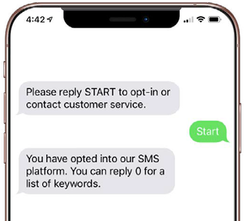
Reply "Start" to opt-in to text payments
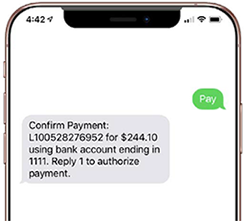
Reply "Pay" to initiate payment and "1" to authorize
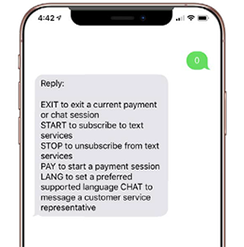
Access the messaging prompt menu by texting "0"
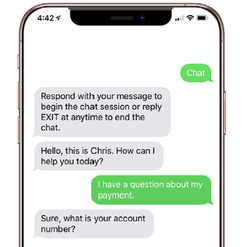
Text "Chat" to connect with a live support representative